
Giao thức POP3, SMTP, IMAP là gì? Chi tiết số Port của chúng trên Email Server
SMTP là giao thức chuẩn TCP/IP được dùng để truyền tải thư điện tử (email) trên mạng internet. SMTP Port - giao thức truyền và nhận tin
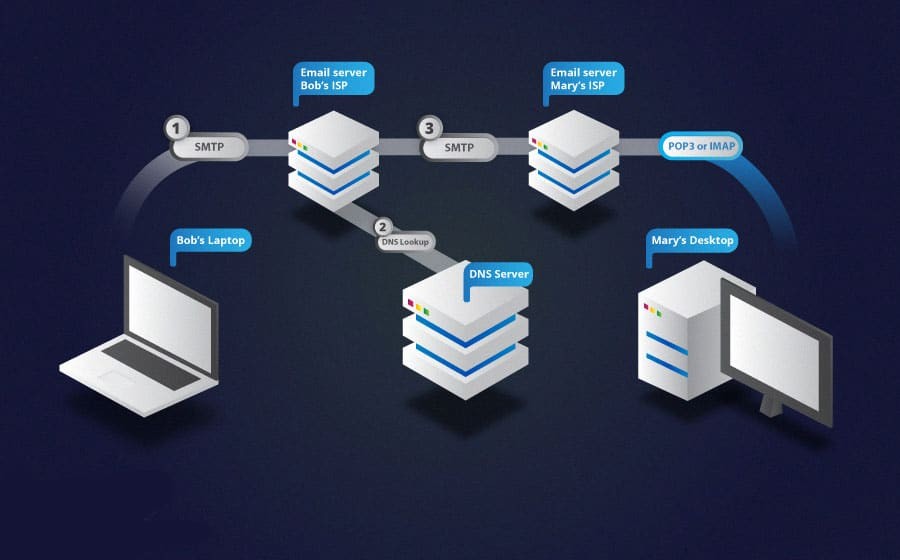
Sử dụng email nhiều rồi nhưng bạn đã từng tò mò cách thức hoạt động của nó ra sao chưa? Bài viết này, BKNS sẽ giải thích cho bạn về cách nó hoạt động như thế nào, giao thức truyền và nhận tin ra sao, SMTP Port là gì. Cũng như cung cấp kiến thức về các thuật ngữ POP3, SMTP, IMAP là gì và hơn thế nữa. Mời bạn cùng đón đọc.
POP3 là gì và port POP3 là gì?
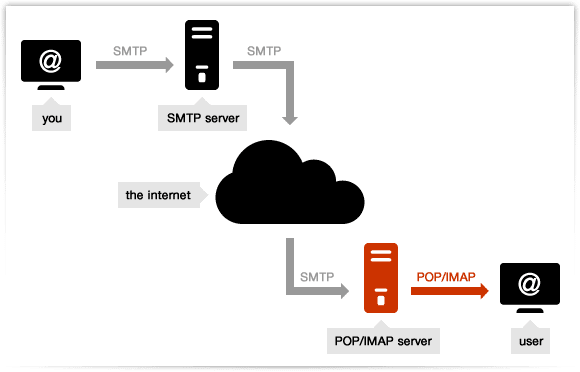
POP3 là viết tắt của Post Office Protocol version 3 là một giao thức tầng ứng dụng, dùng để lấy thư điện tử từ server mail, thông qua kết nối TCP/IP.
POP3 (Post Office Protocol version 3) được sử dụng để kết nối tới server email và tải email xuống máy tính cá nhân thông qua một ứng dụng email như Outlook, Thunderbird, Windows Mail, Mac Mail,…
POP3 là giao thức 1 chiều, có nghĩa là email được “kéo” từ email server từ xa xuống email client.
Mặc định, port POP3 là:
Port 110 – port không mã hóa
Port 995 – SSL/TLS port, cũng có thể được gọi là POP3S.
IMAP là gì và port IMAP mặc định là gì?
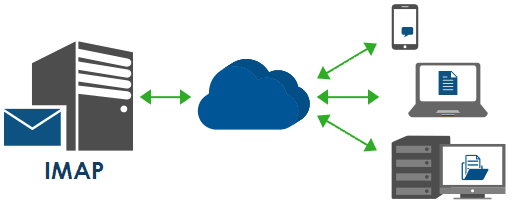
IMAP là viết tắt của Internet Message Access Protocol, là giao thức chuẩn Internet được sử dụng bởi các ứng dụng email để truy xuất thư email từ máy chủ thư qua kết nối TCP/IP.
Khác với POP3, đây là kênh liên lạc 2 chiều, thay đổi trên mail client sẽ được chuyển lên server. Sau này, giao thức này trở nên phổ biến nhờ nhà cung cấp email lớn nhất thế giới, Gmail, khuyên dùng thay vì POP3.\
Port IMAP mặc định:
Port 143 – port không mã hóa
Port 993 – SSL/TLS port, cũng có thể được gọi là IMAPS
SMTP là gì?
SMTP (Simple Mail Transfer Protocol) là giao thức chuẩn TCP/IP được dùng để truyền tải thư điện tử (email) trên mạng internet.
Nó thiết lập kênh kết nối giữa mail client và mail server, và thiết lập kênh liên lạc giữa mail server gửi và mail server nhận. Quá trình này được điều khiển bởi Mail Transfer Agent (MTA) trên email server của bạn. Cũng vậy, SMTP chỉ được dùng cho mục đích gửi email.
SMTP ports:
Port 25 – port không mã hóa
Port 465 – SSL/TLS port, cũng có thể được gọi là SMTPS
Danh sách port POP3 & SMTP Email Server phổ biến
Dưới đây là 27 port POP 3 và SMTP Server được sử dụng nhiều nhất hiện nay
- Google Mail – Gmail Port
- Port Outlook.com
- Port Yahoo Mail
- Yahoo Mail Plus
- Yahoo UK
- Yahoo Deutschland
- Yahoo AU/NZ
- Port Mail O2
- Port Mail O2.uk
- Port Mail AT&T
- NTL @ntlworld.com
- BT Connect
- BT Openworld
- BT Internet
- Orange
- Orange.uk
- Wanadoo UK
- Port Hotmail
- O2 Online Deutschland
- T-Online Deutschland
- 1&1 (1and1)
- 1 &1 Deutschland
- Comcast
- Verizon
- Verizon (Yahoo hosted)
- zoho Mail
- Mail.com
Phân biệt giữa các smtp port
Default Ports: | Server: | Authentication: | Port: |
SMTP Server (Outgoing Messages) | Non-Encrypted | AUTH | 25 (or 587) |
Secure (TLS) | StartTLS | 587 | |
Secure (SSL) | SSL | 465 | |
POP3 Server (Incoming Messages) | Non-Encrypted | AUTH | 110 |
Secure (SSL) | SSL | 995 |
Google Mail – Gmail Port | Server: | Authentication: | Port: |
SMTP Server (Outgoing Messages) | smtp.gmail.com | SSL | 465 |
smtp.gmail.com | StartTLS | 587 | |
POP3 Server (Incoming Messages) | pop.gmail.com | SSL | 995 |
Please make sure, that POP3 access is enabled in the account settings. Login to your account and enable POP3. |
Port Outlook.com | Server: | Authentication: | Port: |
SMTP Server (Outgoing Messages) | smtp.live.com | StartTLS | 587 |
POP3 Server (Incoming Messages) | pop3.live.com | SSL | 995 |
Port Yahoo Mail | Server: | Authentication: | Port: |
SMTP Server (Outgoing Messages) | smtp.mail.yahoo.com | SSL | 465 |
POP3 Server (Incoming Messages) | pop.mail.yahoo.com | SSL | 995 |
Yahoo Mail Plus | Server: | Authentication: | Port: |
SMTP Server (Outgoing Messages) | plus.smtp.mail.yahoo.com | SSL | 465 |
POP3 Server (Incoming Messages) | plus.pop.mail.yahoo.com | SSL | 995 |
Yahoo UK | Server: | Authentication: | Port: |
SMTP Server (Outgoing Messages) | smtp.mail.yahoo.co.uk | SSL | 465 |
POP3 Server (Incoming Messages) | pop.mail.yahoo.co.uk | SSL | 995 |
Yahoo Deutschland | Server: | Authentication: | Port: |
SMTP Server (Outgoing Messages) | smtp.mail.yahoo.com | SSL | 465 |
POP3 Server (Incoming Messages) | pop.mail.yahoo.com | SSL | 995 |
Yahoo AU/NZ | Server: | Authentication: | Port: |
SMTP Server (Outgoing Messages) | smtp.mail.yahoo.com.au | SSL | 465 |
POP3 Server (Incoming Messages) | pop.mail.yahoo.com.au | SSL | 995 |
Port Mail O2 | Server: | Authentication: | Port: |
SMTP Server (Outgoing Messages) | smtp.o2.ie | 25 | |
POP3 Server (Incoming Messages) | pop3.o2.ie | 110 |
Port Mail O2.uk | Server: | Authentication: | Port: |
SMTP Server (Outgoing Messages) | smtp.o2.co.uk | 25 | |
POP3 Server (Incoming Messages) | pop3.o2.co.uk | 110 |
Port Mail AT&T | Server: | Authentication: | Port: |
SMTP Server (Outgoing Messages) | smtp.att.yahoo.com | SSL | 465 |
POP3 Server (Incoming Messages) | pop.att.yahoo.com | SSL | 995 |
NTL @ntlworld.com | Server: | Authentication: | Port: |
SMTP Server (Outgoing Messages) | smtp.ntlworld.com | SSL | 465 |
POP3 Server (Incoming Messages) | pop.ntlworld.com | SSL | 995 |
BT Connect | Server: | Authentication: | Port: |
SMTP Server (Outgoing Messages) | pop3.btconnect.com | 25 | |
POP3 Server (Incoming Messages) | mail.btconnect.com | 110 |
BT Openworld | Server: | Authentication: | Port: |
SMTP Server (Outgoing Messages) | mail.btopenworld.com | 25 | |
POP3 Server (Incoming Messages) | mail.btopenworld.com | 110 |
BT Internet | Server: | Authentication: | Port: |
SMTP Server (Outgoing Messages) | mail.btinternet.com | 25 | |
POP3 Server (Incoming Messages) | mail.btinternet.com | 110 |
Orange | Server: | Authentication: | Port: |
SMTP Server (Outgoing Messages) | smtp.orange.net | 25 | |
POP3 Server (Incoming Messages) | pop.orange.net | 110 |
Orange.uk | Server: | Authentication: | Port: |
SMTP Server (Outgoing Messages) | smtp.orange.co.uk | 25 | |
POP3 Server (Incoming Messages) | pop.orange.co.uk | 110 |
Wanadoo UK | Server: | Authentication: | Port: |
SMTP Server (Outgoing Messages) | smtp.wanadoo.co.uk | 25 | |
POP3 Server (Incoming Messages) | pop.wanadoo.co.uk | 110 |
Port Hotmail | Server: | Authentication: | Port: |
SMTP Server (Outgoing Messages) | smtp.live.com | SSL | 465 |
POP3 Server (Incoming Messages) | pop3.live.com | SSL | 995 |
O2 Online Deutschland | Server: | Authentication: | Port: |
SMTP Server (Outgoing Messages) | mail.o2online.de | 25 | |
POP3 Server (Incoming Messages) | pop.o2online.de | 110 |
T-Online Deutschland | Server: | Authentication: | Port: |
SMTP Server (Outgoing Messages) | securesmtp.t-online.de | StartTLS | 587 |
POP3 Server (Incoming Messages) | securepop.t-online.de | SSL | 995 |
1&1 (1and1) | Server: | Authentication: | Port: |
SMTP Server (Outgoing Messages) | smtp.1and1.com | StartTLS | 587 |
POP3 Server (Incoming Messages) | pop.1and1.com | SSL | 995 |
1&1 Deutschland | Server: | Authentication: | Port: |
SMTP Server (Outgoing Messages) | smtp.1und1.de | StartTLS | 587 |
POP3 Server (Incoming Messages) | pop.1und1.de | SSL | 995 |
Comcast | Server: | Authentication: | Port: |
SMTP Server (Outgoing Messages) | smtp.comcast.net | 587 | |
POP3 Server (Incoming Messages) | mail.comcast.net | 110 |
Verizon | Server: | Authentication: | Port: |
SMTP Server (Outgoing Messages) | outgoing.verizon.net | SSL | 465 |
POP3 Server (Incoming Messages) | incoming.verizon.net | SSL | 995 |
Verizon (Yahoo hosted) | Server: | Authentication: | Port: |
SMTP Server (Outgoing Messages) | outgoing.yahoo.verizon.net | 587 | |
POP3 Server (Incoming Messages) | incoming.yahoo.verizon.net | 110 |
zoho Mail | Server: | Authentication: | Port: |
SMTP Server (Outgoing Messages) | smtp.zoho.com | SSL | 465 |
IMAP Server (Incoming Messages) | pop.zoho.com | SSL | 995 |
Mail.com | Server: | Authentication: | Port: |
SMTP Server (Outgoing Messages) | smtp.mail.com | SSL | 465 |
IMAP Server (Incoming Messages) | pop.mail.com | SSL | 995 |
Kết luận
Trên đây là toàn bộ kiến thức về SMTP Port mà BKNS chia sẻ. Hy vọng rằng, bạn đã hiểu hơn về các smtp port và phân biệt được chúng. Nếu có thắc mắc, xin vui lòng để lại comment phía dưới để được giải đáp.
Đừng quên, BKNS là đơn vị cung cấp các dịch vụ tên miền, hosting giá rẻ, email, chứng chỉ SSL, Vps, thuê máy chủ riêng, thiết kế web chuyên nghiệp. Bạn có thể liên hệ với BKNS qua số điện thoại 1900.63.68.09 hoặc “kinhdoanh@bkns.vn” khi có nhu cầu.